



ACDSee Photo Studio Home 2026
€48,50
Conquer Your Digital Clutter
Master your photo collection with confidence. ACDSee Photo Studio Home 2026 matches smart, locally powered Artificial Intelligence (AI) with trusted editing and organizational tools to give you full control over your images, making photo management intuitive, powerful, and yours.
Brand: ACD Systems
Operating system: Windows
Language: English
Description
What’s new in ACDSee Photo Studio Home 2026
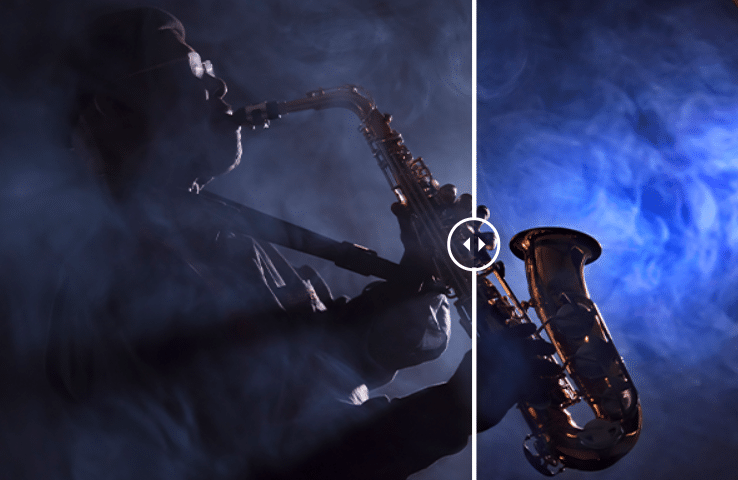
Dehaze
Transform a dull, muted image into one that feels sharp, dimensional, and alive with the Dehaze tool. Applying Dehaze restores depth and vibrancy by cutting through the haze, fog, or smoke to show richer contrast, clearer details, and more accurate colors. It’s especially useful for landscape photography where distant mountains, city skylines, or natural vistas lose impact due to haze, but it’s equally powerful for everyday shots that need clarity and punch. New in ACDSee Photo Studio Home 2026.

Improved Face Detection & People Mode
Narrower face labels in View Mode ensure no one is missed while using AI Face Detection on group photos. Find your people faster with new grouping options in People Mode, ACDSee Photo Studio’s AI-driven mode for identifying and managing people in your portfolio. Change modes without skipping a beat, your selection will remain right where you left it as you switch between modes.
Video Metadata Support
Your video files are now a seamless part of your workflow. View GPS details and standard metadata fields in the Properties pane’s default view, or dive deeper into the video and audio streams with the new All Video Metadata view. With Advanced Search supporting video-specific fields, and many new Auto Categories to search your video files, you have everything you need to organize and manage your videos, on your terms.

Expanded Activity Manager
No more waiting for tasks to complete, thanks to the updated Activity Manager, background processing lets you continue working while operations run. With multi-threading, multiple activities run simultaneously, so you can import, convert and resize batches of photos, and detect faces, all without ever slowing down. Track progress in real-time and experience a faster, more efficient workflow designed for high-volume demands.
ACDSee Home Page
Take charge of your workflow from the moment you launch ACDSee. The new Home Page gives you immediate access to essential tools. Jump into Quick Searches, filter your photos with one-click options like Recently Modified or Tagged, and perform common tasks such as creating or importing images, finding duplicates, or cataloging files—all from a single screen.
Improved ACDSee Tabs
Pick up right where you left off. ACDSee Tabs can now retain your open tabs between sessions, making it easy to resume previous searches and folder views without starting over.
Improved File Support
Broaden your editing and metadata options with added IPTC metadata support for JPEG XL (JXL), and AVIF formats.
System Requirements
To activate your software, to validate your subscriptions, or to access online services, you will need a valid email address and an internet connection.
Hardware
– Intel or AMD processor with 64-bit support
– Intel i5 or better processor recommended
– 8 GB RAM (16 GB RAM or more recommended)
– DirectX 12 compatible graphics adapter (feature level 12_0 or later)
– 2 GB Video RAM (4 GB VRAM recommended)
– 1280 x 800 display resolution (1920 x 1080 recommended)
– 5 GB of available hard drive space
Software
– Windows 10 (64-bit editions only) & Windows 11
– Microsoft Edge
– Microsoft DirectX 12
– Windows Media Player 9.0