


DWGSee CAD 2027
€148,25
DWGSee CAD is a Lightweight 2D computer-aided design (CAD) software that architects, engineers, construction professionals, and designers rely on to:
– View, measure and markup
– Design, draft, and manage document
– Editing and annotation
Brand: AutoDWG
Operating system: Windows
Language: English
Description
In contrast to DWGSee Viewer, DWGSee CAD 2027 offers expanded design and editing capabilities, making it a lightweight CAD solution.
– With DWGSee CAD, users can quickly open and modify their drawings, just as they can with DWGSee DWG Viewer.
– The software provides users with a variety of drawing, editing, and annotation tools, allowing them to create 2D drawings.
– For advanced designers, DWGSee CAD 2027 includes features such as Dimension Driven.
What’s new in DWGSee CAD 2027
SCRIPT
Executes a sequence of commands from a script file.
A script is a text file with an .scr file extension. Each line of the script file contains a command that can be completed at the Command prompt.
The Select Script File dialog box (a standard file selection dialog box) is displayed. Enter the file name of a script to run that script.
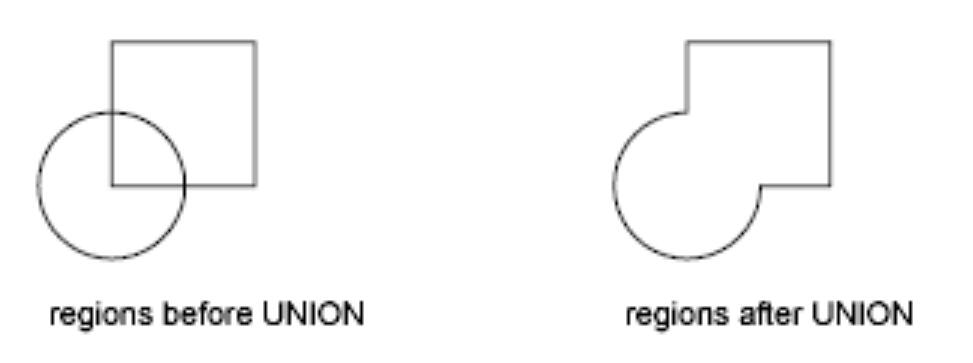
UNION(Command)
Combines two or more solids, surfaces, or regions into a single, composite solid, surface, or region.
SUBTRACT (Command)
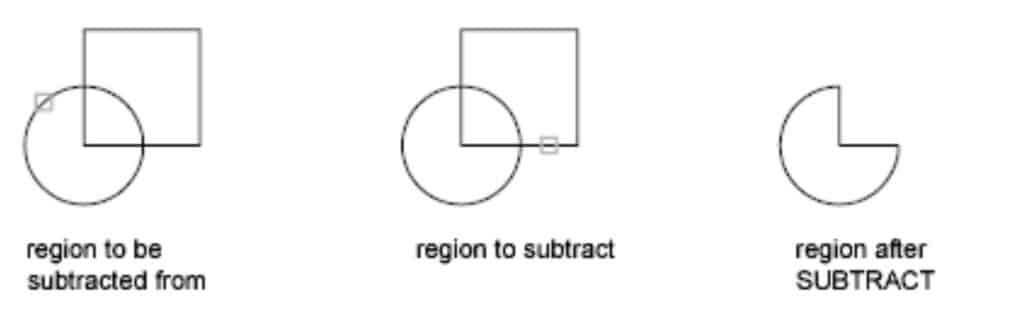
Creates as a new object by subtracting one overlapping region.
With SUBTRACT, you can create a 2D region object by subtracting one set of existing region objects from another, overlapping set.
When subtracting regions, objects in the second selection set are subtracted from objects in the first selection set, and a single new region is created.
MASSPROP
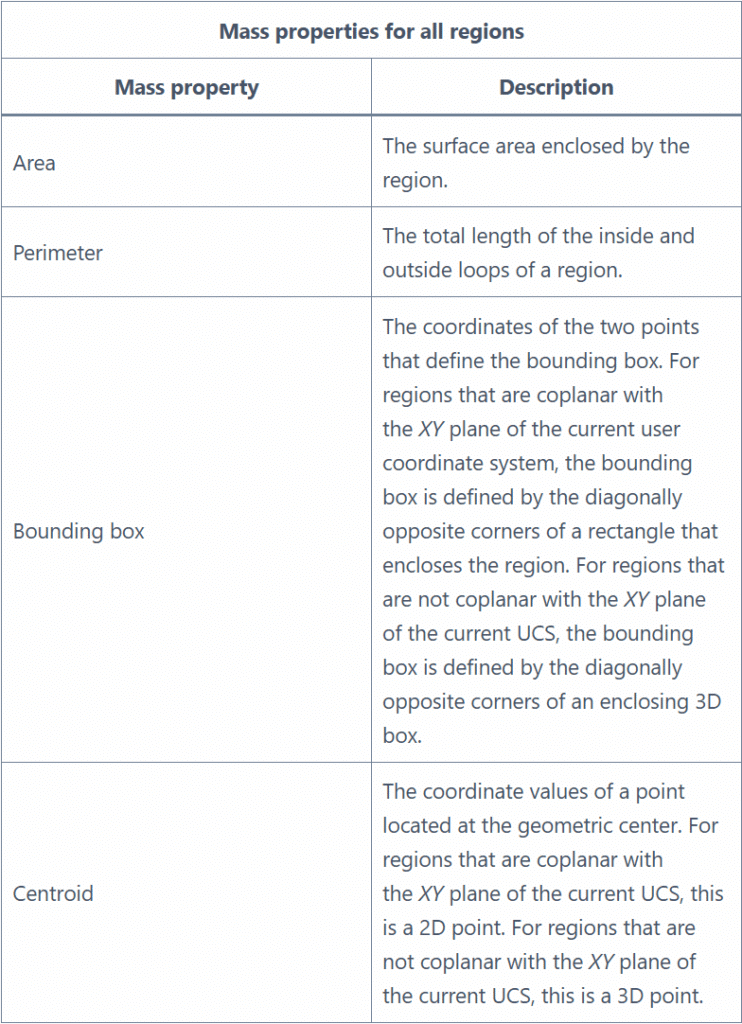
Calculates the mass properties of selected 2D regions.
The following table shows the mass properties that are displayed for all regions.
If the regions are coplanar with the XY plane of the current UCS, the additional properties shown in the following table are displayed.
Enter massprop at the Command prompt.
The following prompts are displayed.
Select objects
Use an object selection method to select either regions or 3D solids for analysis. If you select multiple regions, only those that are coplanar with the first selected region are accepted.
Rename
Changes the names assigned to items such as layers and dimension styles.
Named objects are categories of items such as layers, dimension styles, table styles, text styles, and so on. It is strongly recommended that you create standard naming conventions for them and save them in drawing template files.
The Rename dialog box is displayed.
If you enter rename at the Command prompt, options are displayed.
System Requirements
Operating System: Windows 11,Windows 10, Windows 8.1, Windows 7 (SP1 or later)
Processor:
– Minimum: Intel Core i3 or AMD equivalent processor
– Recommended: Intel Core i5 or higher, or AMD Ryzen 5 or higher, for handling more complex CAD files and faster rendering
Memory (RAM):
– Minimum: 4GB of RAM
– Recommended: 8GB or more of RAM for smoother multitasking and handling larger DWG files
Graphics Card (GPU):
– Minimum: DirectX 11-compatible graphics card with at least 1GB of dedicated video memory
– Recommended: A mid-range to high-end graphics card with at least 2GB of dedicated VRAM, for enhanced performance
Storage:
– Minimum: 2GB of available hard disk space for installation
– Recommended: SSD (Solid State Drive) for faster application load times and overall system responsiveness