


Parallels Desktop for Mac 26
€45,85
Optimized for macOS 26 Tahoe. Ready for IT.
Designed for every user.
Say hello to the latest Parallels Desktop, optimized for macOS 26 Tahoe and packed with new capabilities to help IT teams strengthen security, enforce policy, and streamline deployment. From centralized VM controls to improved Jamf integration and deployment guides, this release focuses on compatibility, IT confidence, and productivity—whether you’re managing one Mac or thousands.
Brand: Corel
Operating system: Mac
Language: Dutch, English, French, German, Spanish
Description
What’s new in Parallels Desktop for Mac 26
Welcome macOS 26 Tahoe with the latest Parallels Desktop
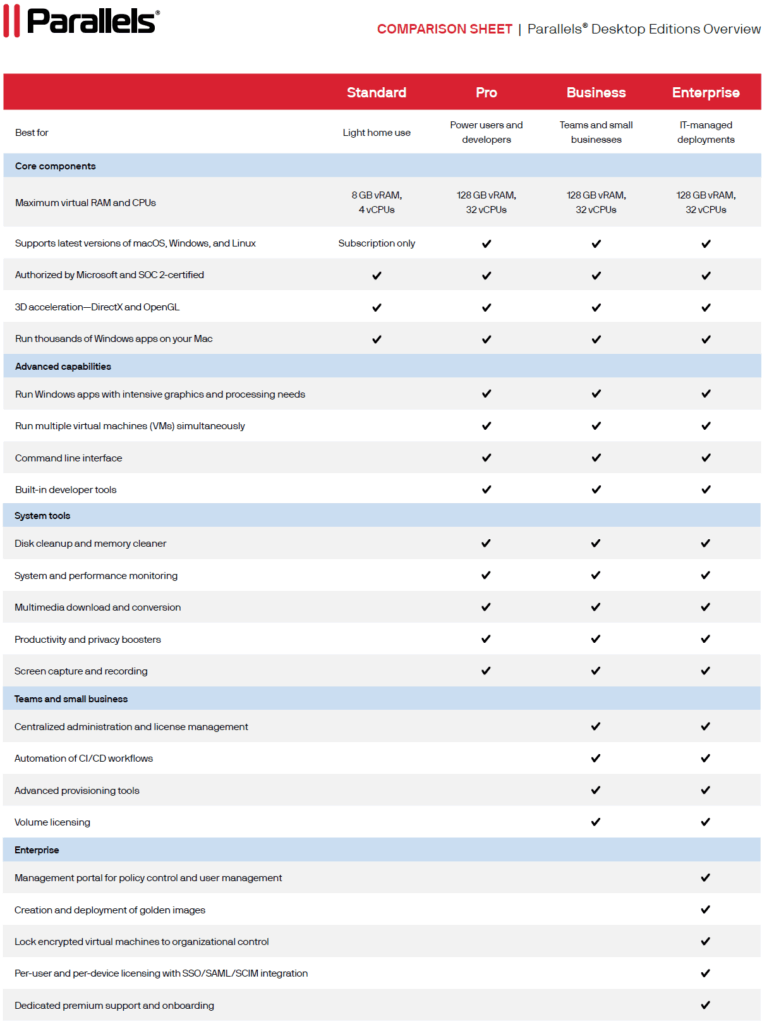
Standard / Pro / Business / Enterprise
The latest Parallels Desktop is fully optimized for macOS 26 Tahoe, so you can upgrade with confidence and keep your workflows running without interruption.
– Handles new background process rules introduced in macOS 26
– Maintains core VM features, including Coherence Mode
– Updated Dock and menu bar icons to better match macOS 26 visuals
– Ongoing compatibility updates to support every macOS 26 point release
– New versioning aligns Parallels Desktop with macOS version numbers (Parallels Desktop 26 = macOS Tahoe 26)

Accurate Mac disk space visibility in Windows VMs
Standard / Pro / Business / Enterprise
Windows VMs can now detect how much disk space is truly available on the Mac host—helping prevent slowdowns, failed installations, or crashes due to disk overuse.
– Prevents Mac freezes and crashes caused by unexpected disk overuse
– Keeps users informed during large installations or transfers inside Windows
– Helps IT reduce support cases related to disk availability

SOC 2 Type II compliance renewed
Business / Enterprise
Parallels Desktop for Mac 26 has successfully completed its SOC 2 Type II audit for the latest reporting period, reaffirming its commitment to enterprise security and compliance.
– Demonstrates adherence to industry-recognized security and privacy controls
– Supports IT admins and security teams in meeting regulatory and compliance requirements
– Reinforces enterprise confidence through continuous, independently verified controls
Single Windows app deployment and management guide
Business / Enterprise
New documentation walks IT teams through deploying individual Windows applications on Macs—without exposing users to full Windows environments.
– Step-by-step instructions suitable for teams with limited macOS or Windows admin experience
– Enables clean, minimal setups for specialized workflows or legacy app use
– Helps IT follow Parallels-recommended best practices
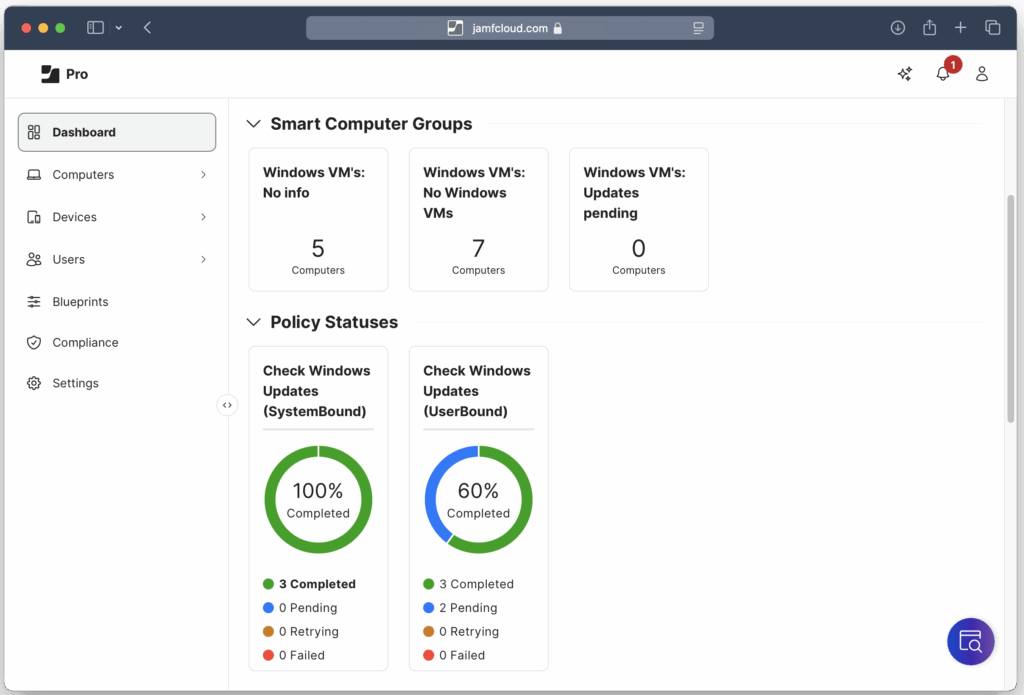
Monitor and manage Windows VM updates with Jamf
Business / Enterprise
Using Jamf policies and extension attributes, IT admins can now manage Windows OS updates inside virtual machines.
– Check update status and initiate scans/installs from Jamf Pro
– View update state directly in Jamf inventory records
– Avoid reliance on in-VM tools, reducing cost and complexity
Version comparison
System Requirements
Minimum
Run most applications such as Microsoft Office, accounting software, trading software, and more.
Processor
– Any Apple silicon chip (M-series)
– Core i5, Core i7, Core i9, Intel Core M or Xeon processor
Memory
– 4 GB of RAM
Storage
– 600 MB for Parallels Desktop application installation
– Additional disk space for the guest operating system (at least16 GB is required for WindowsOS)
Graphics
– Any Apple silicon chip (M-series)
– Intel, AMD Radeon, or NVIDIA graphics cards
Operating System
– macOS Tahoe 26.0 or newer (when released)
– macOS Sequoia 15.5 or newer
– macOS Sonoma 14.7 or newer
– macOS Ventura 13.7 or newer
Best Performance
For graphics-intensive applications, software development, high loads, and running multiple virtual machines.
Processor
– Any Apple silicon chip (M-series)
– Intel Core i5, Core i7, Core i9 or Xeon processor
Memory
– 16 GB of RAM or more
Storage
– SSD drive
Graphics
– Any Apple silicon chip (M-series)
– AMD Radeon Pro graphics card
Operating System
– macOS Tahoe 26.0 (when released)
– macOS Sequoia 15.5 or newer
– macOS Sonoma 14.7 or newer
– macOS Ventura 13.7 or newer
An internet connection is required for product installation, activation, updates, and select features.